Convert Any Video Format to Text in Minutes
Need a fast, accurate way to convert a video into text? Go Transcribe makes video to text transcription simple and fully automated with AI-powered accuracy.
File options
Export your transcript as Word (.doc), PDF, SRT, VTT and more.
Go Transcribe supports a wide range of video formats you can convert to text
Upload recordings from phones, cameras, webinars, meetings, editing tools and more. Our platform converts most common video formats into clean, editable transcripts.
| Format | File Type | File Output |
|---|---|---|
| 3G2 | Video | Convert 3G2 files to text |
| 3GP | Video | Convert 3GP files to text |
| AVI | Video | Convert AVI files to text |
| FLV | Video | Convert FLV files to text |
| M2TS | Video | Convert M2TS files to text |
| M2V | Video | Convert M2V files to text |
| M4V | Video | Convert M4V files to text |
| MK3D | Video | Convert MK3D files to text |
| MKV | Video | Convert MKV files to text |
| MOOV | Video | Convert MOOV files to text |
| MOV | Video | Convert MOV files to text |
| MP4 | Video | Convert MP4 files to text |
| MPEG | Video | Convert MPEG files to text |
| MPG | Video | Convert MPG files to text |
| MTS | Video | Convert MTS files to text |
| MXF | Video | Convert MXF files to text |
| OGX | Video | Convert OGX files to text |
| QT | Video | Convert QT files to text |
| SWF | Video | Convert SWF files to text |
| TS | Video | Convert TS files to text |
| VOB | Video | Convert VOB files to text |
| WEBM | Video | Convert WEBM files to text |
| WMV | Video | Convert WMV files to text |
How Video to Text Conversion Works
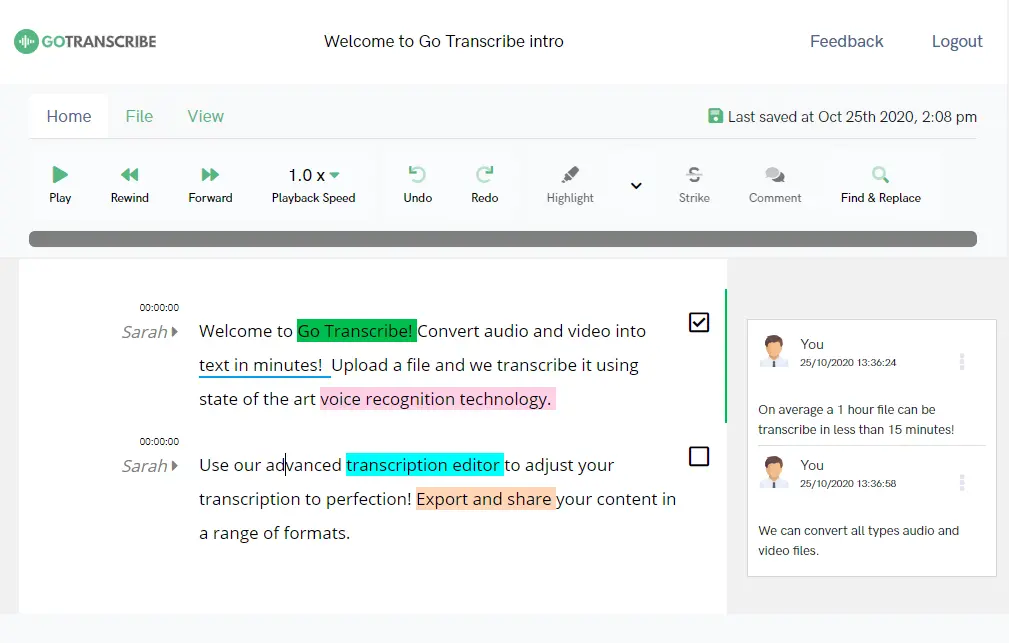
Upload your video file to our secure cloud platform
Our AI automatically converts your video to text with high accuracy
Edit and refine your transcript using our online editor
Export your text into Word, PDF, SRT, VTT and other formats
Your video is now fully converted to text and ready to use
Convert Your Video to Text with Go Transcribe
Transcribe 46+ languages. Search across transcripts, edit with ease and export in multiple formats. Start your free trial today — no credit card required.
Start free trialFrequently Asked Questions
Which video formats can I convert to text?
Go Transcribe supports MP4, MOV, M4V, WMV, 3GP and many more video formats.
Is my video stored securely?
All uploaded videos are encrypted. You can delete your files at any time. We do not use customer data to train AI models.
Can I generate subtitles from my video?
Yes. Export SRT or VTT subtitle files ready for YouTube, social media or e-learning platforms.
How long does it take to convert a video to text?
Most videos are transcribed in minutes thanks to our advanced AI transcription engine.