Convert Any Media Format to Text in Minutes

Have an audio or video recording you need in text form? Go Transcribe makes it easy to convert media to text online with fast, automated transcription and no software to install.

Convert Media to Text
Uploading File name

File options

The Email field is not a valid e-mail address. The Email address is already registed. Please sign in here.

Export to Word (.doc), PDF, SRT, VTT and many more formats.

Go Transcribe supports a wide range of media formats you can convert into text

Upload recordings from cameras, phones, meeting tools and editing software. Our media-to-text converter works with popular audio and video formats and turns them into clean, editable transcripts.

Format File Type File Output
3G2 Video Convert 3G2 files to text
3GA Audio Convert 3GA files to text
3GP Video Convert 3GP files to text
AAC Audio Convert AAC files to text
AIF Audio Convert AIF files to text
AIFC Audio Convert AIFC files to text
AIFF Audio Convert AIFF files to text
AMR Audio Convert AMR files to text
APE Audio Convert APE files to text
AU Audio Convert AU files to text
AVI Video Convert AVI files to text
CAF Audio Convert CAF files to text
DS2 Audio Convert DS2 files to text
DSS Audio Convert DSS files to text
FLAC Audio Convert FLAC files to text
FLV Video Convert FLV files to text
GSM Audio Convert GSM files to text
M2TS Video Convert M2TS files to text
M2V Video Convert M2V files to text
M4A Audio Convert M4A files to text
M4V Video Convert M4V files to text
MK3D Video Convert MK3D files to text
MKA Audio Convert MKA files to text
MOOV Video Convert MOOV files to text
MOV Video Convert MOV files to text
MP1 Audio Convert MP1 files to text
MP2 Audio Convert MP2 files to text
MP3 Audio Convert MP3 files to text
MP4 Video Convert MP4 files to text
MPA Audio Convert MPA files to text
MPEG Video Convert MPEG files to text
MPG Video Convert MPG files to text
MPGA Audio Convert MPGA files to text
MTS Video Convert MTS files to text
MXF Video Convert MXF files to text
OGA Audio Convert OGA files to text
OGG Audio Convert OGG files to text
OGX Video Convert OGX files to text
OPUS Audio Convert OPUS files to text
QCP Audio Convert QCP files to text
QT Video Convert QT files to text
RTA Audio Convert RTA files to text
SWF Video Convert SWF files to text
TS Video Convert TS files to text
TTA Audio Convert TTA files to text
VOB Video Convert VOB files to text
WAV Audio Convert WAV files to text
WEBA Audio Convert WEBA files to text
WEBM Video Convert WEBM files to text
WMA Video Convert WMA files to text
WMV Video Convert WMV files to text

How Media to Text Conversion Works

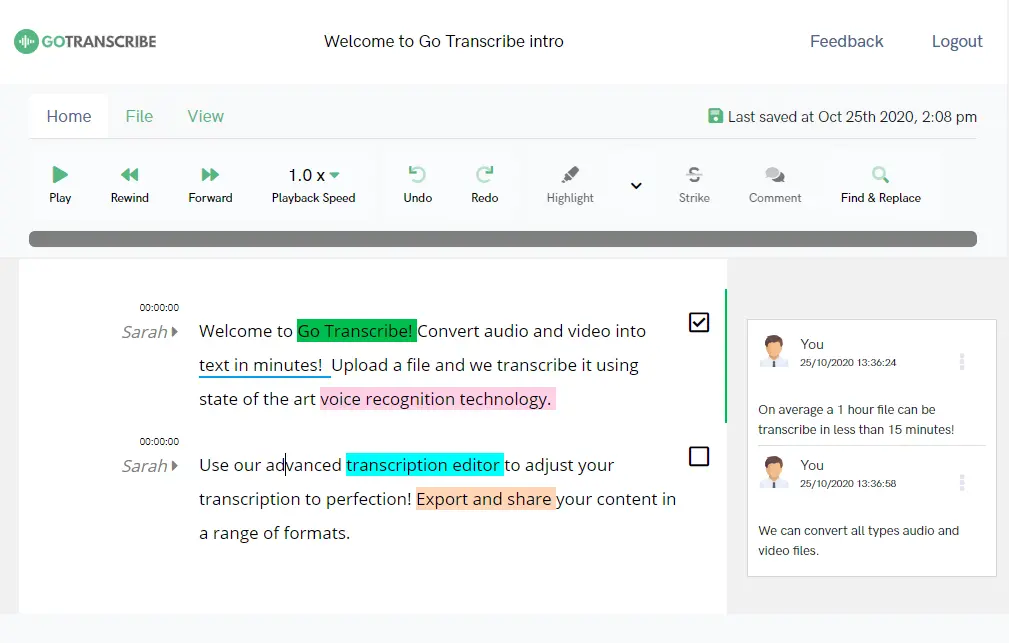
Go Transcribe editor used to convert media to text
1

Upload your audio or video file to our secure, cloud-based platform

2

Our AI automatically converts your media to text using advanced transcription technology

3

Review, search and edit the transcript in minutes using our online editor

4

Export your transcript into a variety of formats including Word, PDF, SRT and VTT

5

That’s it — your media file has been successfully converted into text and is ready to share

Convert Your Media to Text with Go Transcribe

Transcribe dozens of languages from both audio and video. Organise your transcripts, search across recordings, edit and share them with others. Start your free trial and convert your media files into text now. No credit card required.

Start free trial

Frequently Asked Questions

What types of media can I convert to text?

You can convert both audio and video files to text, including interviews, webinars, meetings, lectures, podcasts, and screen recordings.

Which media formats are supported?

Go Transcribe supports popular formats such as MP3, WAV, M4A, MP4, MOV, WMA and more. Use the table above to explore format-specific pages.

Is my media stored securely?

All media files are encrypted in transit and at rest. You can delete your files at any time, and they are not used to train AI models.

Can I generate subtitles from my media?

Yes. Once your media is transcribed, you can export subtitle files such as SRT and VTT for use on YouTube, social media, and e-learning platforms.