Everything you need to transcribe, translate, and share
Powerful AI transcription and one-click translation to 60+ languages, with a full suite of tools to help you work faster and reach a global audience.
Start your free trialAI Assistant
Turn every transcript into a working document. Pull out the highlights, draft the follow-up, and ask questions across your whole library, without leaving Go Transcribe.
Explore the AI AssistantInstant insights
One click pulls action items, chapters, topics, named entities and sentiment out of any transcript. No prompting, no setup.
One-click content
Generate summaries, follow-up emails, meeting minutes, blog posts and show notes from a library of ready-made templates, tuned for your industry.
Templates that know your field
Dozens of templates built for legal, medical, journalism, research, podcasting and more. Each one knows what to look for and how to lay it out.
Ask the transcript
Chat with any transcript directly in the editor. Get a quick answer, jump to the moment it was said, and keep the conversation going.
Ask your whole library
Search across every interview, call and meeting in one place. Every answer comes with clickable citations and timestamps back to the source.
Your data stays yours
Your recordings are your business, and they stay that way. Nothing you upload is ever used to train AI models, so the insight in your transcripts stays yours and yours alone.
AI-Powered Transcription
Upload your audio or video, set your language up front, and get an accurate transcript back in minutes, not hours.
46+ Languages
Transcribe audio in 46+ languages including English, Spanish, French, German, Japanese, Arabic, Mandarin, and many more.
Speaker Identification
Automatically detect and label different speakers in your audio. Rename speakers and track who said what throughout your transcript.
Custom Dictionary
Add your specialist terms once and every transcript is tuned to recognise them. On subscription plans, import an entire glossary from a CSV file in seconds, or export your dictionary to share it with colleagues.
50+ File Formats
Support for MP3, MP4, WAV, M4A, MOV, FLAC, OGG, AVI, MKV, and 40+ more audio and video formats.
Fast Processing
Most transcriptions are ready in less time than the length of your file. A 60-minute recording is typically processed well under an hour.
Powerful Transcript Editor
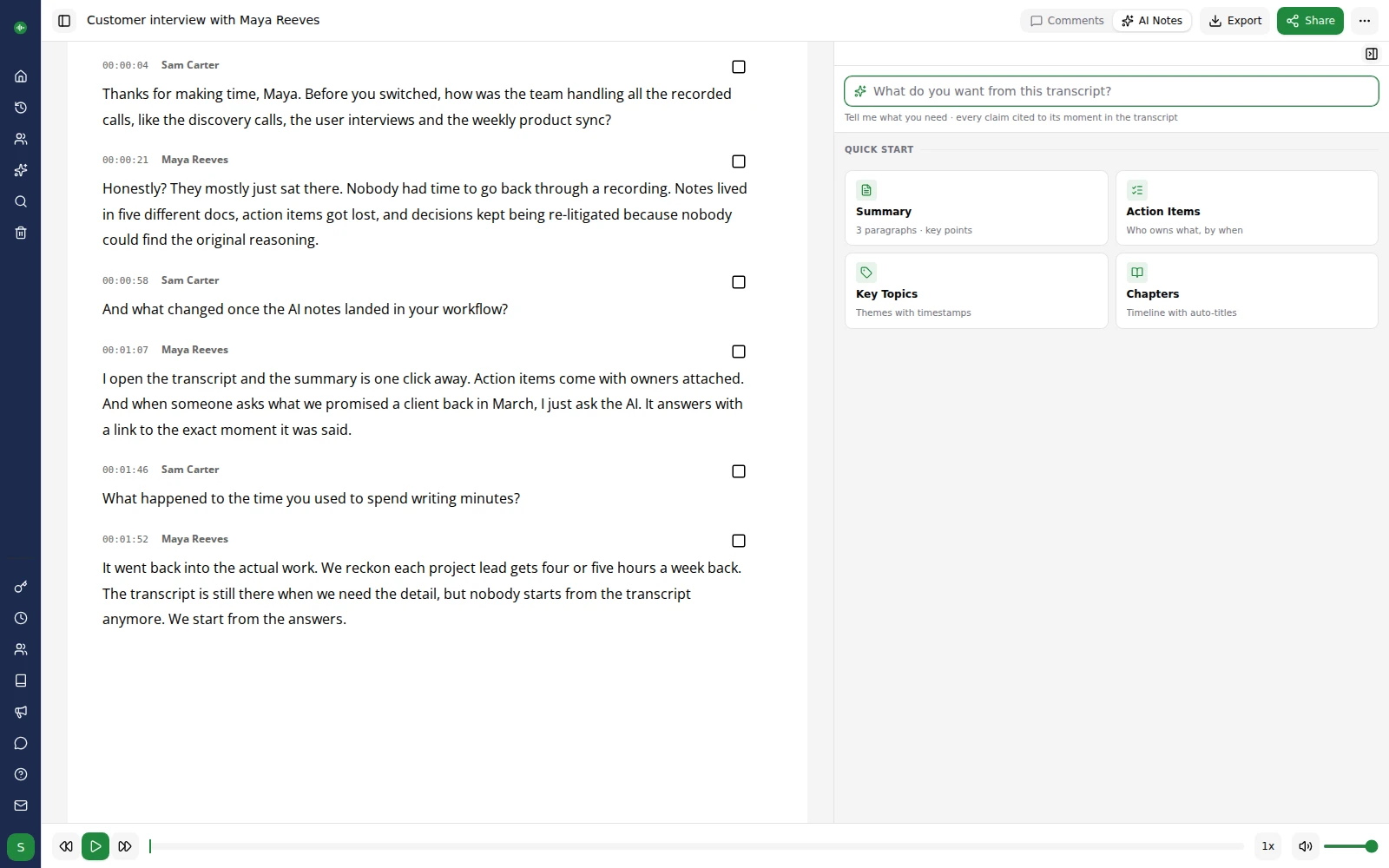
Edit your transcripts with confidence in our online editor. Add rich text formatting, step back through version history at any point, and click any word to jump directly to that moment in the audio.
Audio-Synced Editing
Click any word to jump to that moment in the audio. Edit text while listening, with automatic pause-on-type to keep you in flow. Manage speaker labels and paragraphs with ease.
Highlights & Strikethrough
Mark important passages with colour-coded highlights, and use strikethrough to mark the content you plan to cut.
Comments & Collaboration
Add comments to specific words or passages. Reply to comments, resolve them, and collaborate with your team in real time. @mention a teammate and they land right on your comment with the recording cued to that exact moment, so the right person can weigh in on the right line straight away.
Find & Replace
Search across your entire transcript to find specific words or phrases. Replace text in bulk to update a name or term everywhere in one go.
Add to Dictionary as You Go
Spot a name or term the model got wrong? Select it, add it to your dictionary in one click, and every transcript after that gets it right.
Version History
Browse earlier versions of any transcript and restore one in a click, so you can edit freely. Included on subscription plans.
One-Click Translation
Translate your transcripts to over 60 languages with a single click. Reach a global audience without leaving the editor.
60+ Languages
Translate between any of our supported languages, including English, Spanish, French, German, Japanese, Arabic, Chinese, Hindi, Portuguese, and dozens more.
Translate in One Click
Select a target language and click translate. Your full transcript is translated in the background and ready to review in minutes — no copy-pasting into external tools.
Side-by-Side View
Review your translation alongside the original transcript. Compare paragraph by paragraph to verify accuracy and make edits.
Multiple Translations
Create translations in several languages from a single recording. Switch between them instantly using language tabs in the editor.
Fully Editable
Every translation is a full, editable document with word-level timestamps preserved. Refine wording, fix names, and export just like the original.
Flexible Export Options
Export your transcripts in the format you need, with full control over layout and content.
Microsoft Word (DOCX)
Export polished transcripts to Word with speaker names, timestamps, and your preferred formatting.
Generate professional PDF documents ready for sharing, archiving, or printing.
Subtitles (SRT, VTT, Avid DS)
Export timed subtitles in SRT, WebVTT, or Avid DS format. Configure max characters per line, duration, and multi-line display.
Plain Text & CSV
Export clean plain text or structured CSV data for further analysis or integration with other tools.
Export Customisation
Choose whether speaker names appear before or after timestamps, set timestamp intervals, cap subtitle line lengths, and decide whether highlights, comments, and strikethrough text appear in the exported file.
Post-Production Formats
Hand your transcript straight to the edit suite: Avid DS, Final Cut Pro XML, EDL and EBU-STL exports with frame-accurate timecodes, plus TTML, SBV, SAMI and ASS for broadcast and web players.
Sharing & Embedding
Share your transcripts with anyone, even if they don't have a Go Transcribe account.
Readonly Share Links
Generate a public link and anyone can view your transcript with audio playback, word-level sync, and full-text search. The viewer is fast, works in any browser, and requires no account.
Embeddable Player
Publish an interactive transcript on your website or show notes. Paste the embed code into any page and visitors can read, search, and jump to any moment in the audio, without a Go Transcribe account.
Team & Collaboration
Give your team a shared workspace to work out of, so the right people can find each transcript, review it, and carry the work forward.
Team Members
Invite your colleagues and give each person the right level of access: on Business and above, choose who can view, comment, edit, or manage each workspace, and keep it to a chosen team or open it to everyone. On Pro, every workspace is shared company-wide, so your whole team works from one library.
Shared Dictionary
Build a shared glossary once and every team member gets more accurate transcripts for your domain terminology from day one. Export the dictionary as a CSV to share it, or import it into a new account in seconds. Included with Business.
Folder Organisation
Organise transcriptions into folders and subfolders. Keep projects, clients, or topics neatly separated.
Usage Reports
Track transcription usage across your team with detailed reports showing who transcribed what and when. Included with Business.
Developer API
Integrate transcription directly into your applications and workflows. Included with Pro and Business.
REST API
Create transcriptions, check status, download results, and manage your account programmatically via our REST API.
Webhooks
Receive real-time notifications when transcriptions complete or fail. Configure up to 10 webhook endpoints per account.
API Key Management
Create and manage multiple API keys with usage tracking, and revoke any key instantly.
Security & Privacy
Your data is protected at every step.
Encryption
All files are encrypted in transit (TLS) and at rest. Your data is stored on enterprise-grade Microsoft Azure infrastructure, certified to ISO/IEC 27001, SOC 1, SOC 2, SOC 3 and PCI DSS.
No AI Training
Your files are never used to train AI models. Your content remains yours and is only used for your transcription.
GDPR Compliant
Full compliance with UK GDPR, EU GDPR, and CCPA/CPRA. Data subject rights fully supported.
Secure Payments
Payments processed by Stripe (PCI DSS Level 1 certified). We never store your card details.
Ready to get started?
Try Go Transcribe free and see how much time you can save.
Start your free trial