Bill more with less time
Save time and money
Instead of repeating conversations with clients or stopping to write notes, record your meetings and let Go Transcribe create accurate transcripts for you.
Focus on what matters
Stay present with your clients during calls and meetings. Review the transcript afterwards to capture every detail and instruction.
Organise your conversations
Search transcripts for case names, dates and key phrases so you can quickly revisit exactly what was said and when.
Fast turnaround, even for long meetings
A 60 minute recording typically transcribes in around 10 minutes, so your notes are ready shortly after the meeting.
No setup or voice training required
Upload recordings from your phone, meeting room or video platform and start reviewing transcripts in your browser.
Translate depositions and interviews
Working on multilingual cases? Translate your transcripts to over 60 languages with one click, directly from the editor.
Upload
Sign up for a free account. Upload your audio/video files straight onto our web based transcription platform.
Transcribe
We use industry leading artificial intelligence to transcribe your file. We can transcribe an hour long file in less than 10 minutes.
Review and Export
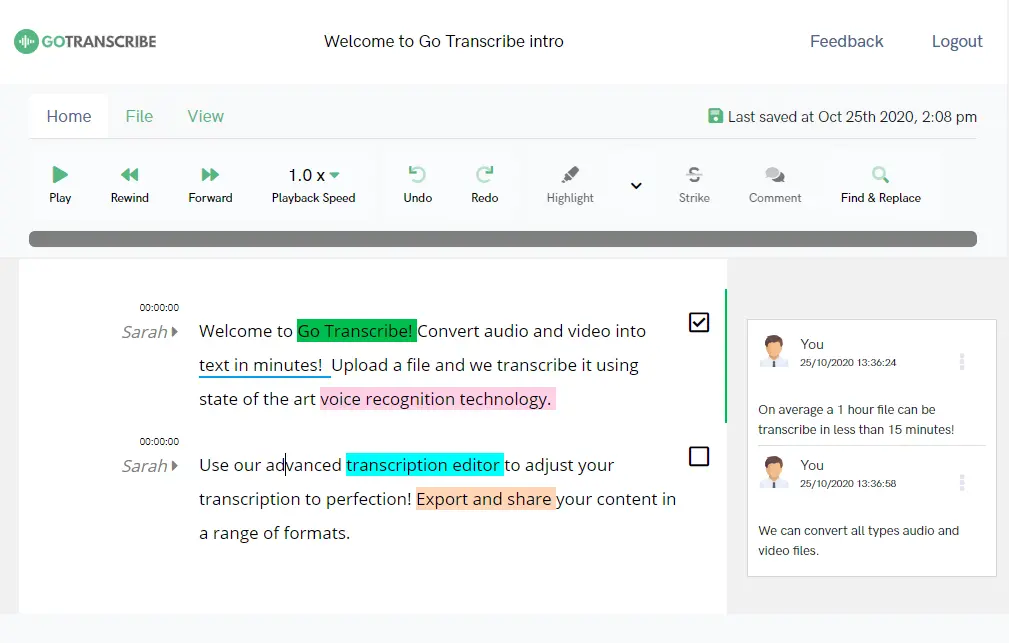
Review and polish your transcripts in the online editor. Export and share your content in a range of formats.
Our customers are our biggest fans.
We don't like to brag, but we don't mind letting our customers do it for us. Here are a few nice things folks have said about our service over the years.
User friendly, efficient and gets the job done! A very useful tool for all those who are not natural note takers!


This has got to be the fastest, easiest and cheapest way to create transcriptions. This makes writing meeting minutes so much easier. A big fan!


We've transcribed six hour-long interviews and go-transcribe works a treat. not 100% by any means, but good enough to save us days of manual transcription.

I used Go Transcribe to make the initial transcription and it was much easier. I'll certainly recommend it and use it again.


This service saves me a ton of time, and for the price the accuracy is really good. I sent a message to the support team and they replied really quickly.















































Transcription for the world
Transcribe your content in over 40 languages. Create subtitles and closed captions to reach a wider audience.
Start free trialConvert your audio to text with Go Transcribe
Transcribe 46+ languages. Organise your interview transcripts, search, edit and share them with others. Start your free trial and convert your audio and video into text now. No credit card required.
Start free trialAI built for legal work
Turn depositions, client calls and witness interviews into briefs, action items and case-wide answers, in seconds.
Summarise depositions and calls
Pull action items, key admissions and exhibit references out of every recording the moment transcription finishes. No prompt-writing required.
Ask across every case file
Type "every time the defendant mentioned the contract" and get clickable citations that jump straight to the moment it was said.
Privilege-grade privacy
Treat it like privileged material, because we do. Your data is never used to train AI models, and what you learn stays between you and your files.
Frequently asked questions for lawyers
Learn how Go Transcribe helps law firms, in-house teams and solo practitioners work more efficiently.
How can lawyers use Go Transcribe in their practice?
Lawyers use Go Transcribe to convert client meetings, witness interviews, dictations and conference calls into text. This makes it easier to draft documents, prepare for hearings and keep detailed records without typing everything manually.
Is Go Transcribe secure enough for confidential legal information?
Yes. Go Transcribe uses enterprise-grade security to protect recordings and transcripts. Files are encrypted and only accessible to you and any collaborators you invite. Go Transcribe is also compliant with the UK GDPR, EU GDPR and CCPA/CPRA. Security page.
Can I search transcripts for case names and key terms?
You can search transcripts for case names, dates, client names and phrases. This makes it much easier to locate specific discussions or confirm exactly what was agreed in a meeting.
How long does it take to transcribe a typical client meeting?
A 60 minute recording typically transcribes in around 10 minutes. You can review and highlight key points shortly after the meeting finishes.
Which file formats can I use and export?
Go Transcribe supports popular audio and video formats such as MP3, MP4, WAV, MOV and M4A. Transcripts can be exported as Word, PDF and plain text for case files, emails and document drafting.
Does Go Transcribe support multiple speakers?
Yes. Go Transcribe can handle multiple speakers such as lawyers, clients, interpreters and witnesses. Speaker labels help you follow who said what throughout the conversation.