Convert WMV to Text Online
Need to convert your WMV video file into text? Go Transcribe provides an automated way to transcribe WMV to text with accurate results back in minutes.
File options
Upload
Upload your WMV video file straight onto our secure web-based transcription platform.
Transcribe
We use industry leading artificial intelligence to transcribe your WMV file. In many cases, an hour-long file is processed in just a few minutes.
Review and Export
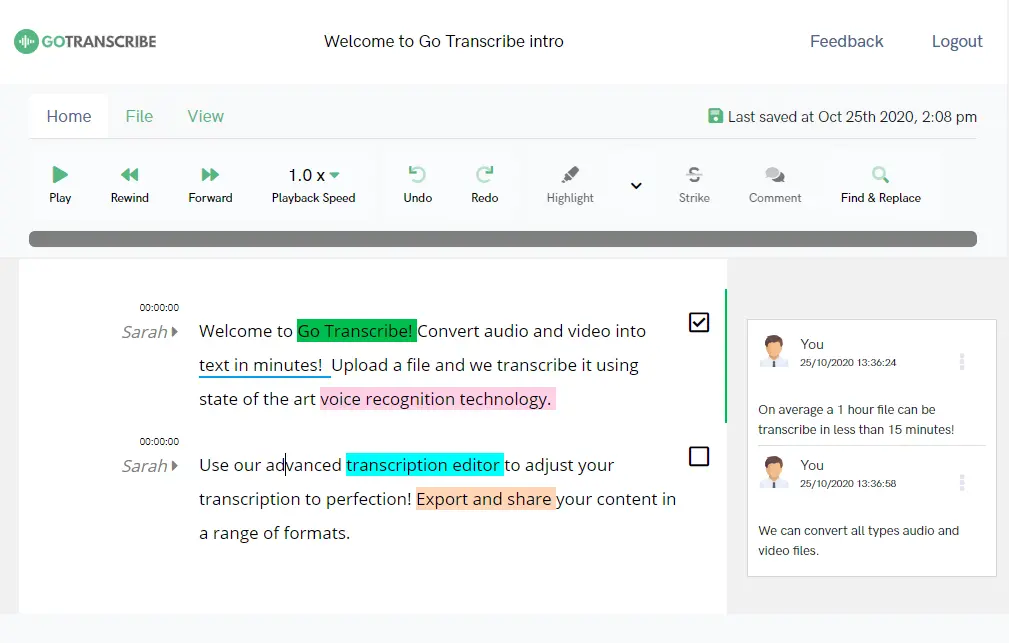
Polish the text in the online editor, then export and share your WMV transcript in a range of formats such as Word, PDF, Avid DS, SubRip and WebVTT.
Ensuring accuracy when automatically transcribing WMV to text
As with any video to text conversion, a few simple recording tips help you get the best possible transcript:
Ensure that speakers are not talking over each other and that the recording device is close to the person speaking.
Try to reduce background noise wherever possible.
Avoid static, echo and very low volume recordings for the best accuracy.
More than text: insights from your audio and video
Don't just transcribe your WMV. Pull summaries, action items and answers out of one file.
Summaries and key points
Get a summary, action items, chapter markers and the topics covered in every WMV file the moment transcription finishes.
Ask anything about your WMV
Chat with your transcript and get an answer with the exact timestamp it was said. Skip the scrubbing on long video files.
Repurpose into content
Turn one WMV into show notes, social posts, blog drafts or meeting minutes. Choose a template, click generate.
F.A.Q
Common questions about our WMV to text service
How long does it take to convert WMV to text?
In most cases it takes less time than the duration of the WMV file. For example, if your WMV file is 1 hour long, Go Transcribe will typically complete the transcription in well under an hour.
Can you convert WMV to subtitles?
Yes. Once the WMV transcription is complete, select Export in the editor and choose either SubRip (.srt) or WebVTT (.vtt) from the dropdown menu. You can also adjust the time and character length for each subtitle.
Is there any file size limit for WMV files?
There is no fixed limit. For the fastest results, we recommend keeping WMV files under 4GB.
How accurate is converting WMV to text?
We use the latest speech recognition technology (ASR) to transcribe speech to text. Our platform is designed to deliver highly accurate WMV transcriptions, and clear recordings give the best results.
Streamline your workflow
Automated transcription with all the features you'll ever need
Automated Transcription
Independently reviewed as one of the most accurate automated services. We include a range of punctuation to improve the readability of transcripts.
Speakers
Each paragraph can be marked with a separate speaker. Add speaker names using our speaker labels to help improve readability.
Custom Dictionary
Add custom vocabulary to improve speech recognition accuracy by prioritising those words when transcribing.
Highlight
Mark any important parts of the transcript and help extract valuable information for further processing.
Export
Flexible export options allow you to export in a range of formats including Word, PDF, SRT and VTT.
Security
Enterprise-grade security built as standard. As part of our core values, we build privacy into everything we do. Find out more here.
Our customers are our biggest fans.
We don't like to brag, but we don't mind letting our customers do it for us. Here are a few nice things folks have said about our service over the years.
User friendly, efficient and gets the job done! A very useful tool for all those who are not natural note takers!


This has got to be the fastest, easiest and cheapest way to create transcriptions. This makes writing meeting minutes so much easier. A big fan!


We've transcribed six hour-long interviews and go-transcribe works a treat. not 100% by any means, but good enough to save us days of manual transcription.

I used Go Transcribe to make the initial transcription and it was much easier. I'll certainly recommend it and use it again.


This service saves me a ton of time, and for the price the accuracy is really good. I sent a message to the support team and they replied really quickly.















































Transcription for the world
Transcribe your content in over 40 languages. Create subtitles and closed captions to reach a wider audience.
Start free trialOther Audio and Video Formats Available for Transcription
Click here to see the full list of supported formats
Convert WMV to Text